From a Git repository
Import an existing MCP server from GitHub and deploy it in one click.
Open-source developer tool for testing and debugging MCP servers. Test tools, explore resources, manage prompts, and monitor connections, with support for MCP-UI and MCP Apps widgets.
Trusted by developers debugging MCP servers at top companies









Add a remote MCP server and start testing it in the Inspector right here.
Choose where to run the Inspector, then connect your server and inspect a tool response.
Open the hosted version in your browser. Connect to an HTTP MCP endpoint that your browser or proxy can reach. No installation needed.
inspector.manufact.comRun locally with a single command. Connect to local servers during development. See the CLI guide for transport and connection options.
npx @mcp-use/inspectorAdd a server, choose its transport, and enter the MCP endpoint URL, such as https://example.com/mcp. Auto mode tries Direct first, then the configured proxy if CORS or network policy blocks the request. Select Direct or Via Proxy when you need to test a specific connection path. Complete the authentication prompt if the server requires it.
Open Tools, select a tool, and fill in its input form. Start with a read-only operation or a test account. Executing a tool can change data in the connected service.
Check the returned content, structured data, and errors. Open the RPC panel to inspect the JSON-RPC exchange. If the response includes an MCP App, preview its widget and inspect its behavior before testing in the target client.
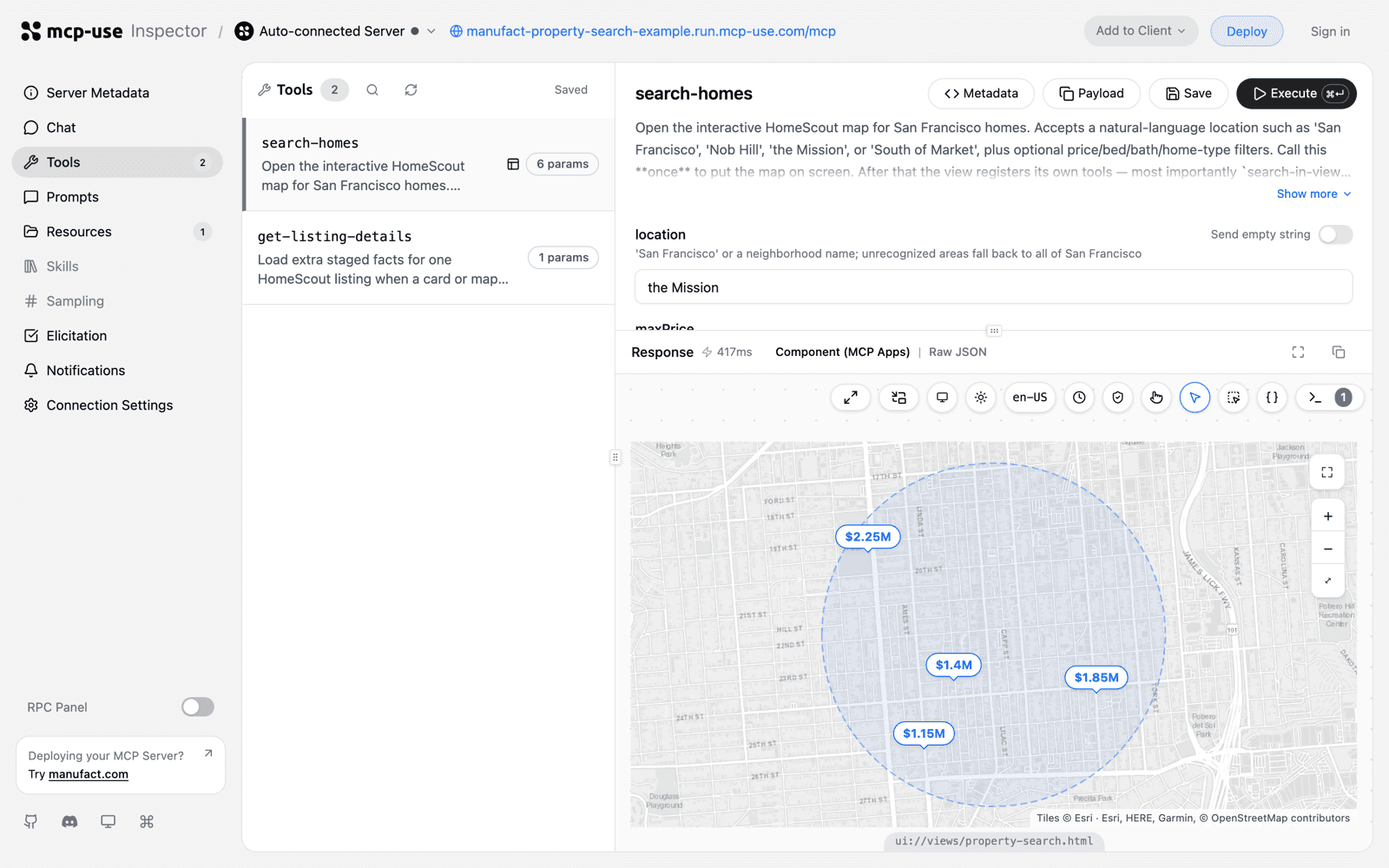
Testing a server locally? Start here with the open-source Inspector. For production traffic, use Cloud Inspector to monitor MCP calls and inspect request/response traces.
Full visibility into your MCP server during development. Test every primitive before connecting to agents.
List, inspect, and execute MCP tools with custom parameters. See request and response data in real time.
Browse and read resources exposed by your server. View metadata, test subscriptions, and inspect content.
View and test prompt templates with different arguments. Validate prompts before connecting to agents.
See every JSON-RPC message between client and server. Debug exactly what gets sent and what comes back.
Test MCP Apps and MCP-UI widgets directly in the Inspector. See how they render in real chat clients.
Connect via stdio, SSE, or HTTP. Test your server regardless of how it communicates with clients.
The Inspector supports MCP Apps and MCP-UI widgets. Test interactive components, verify tool calls, and debug widget state before deploying to production.
The Inspector emulates the window.openai API used by ChatGPT widgets. Use it to inspect widget behavior, then test in ChatGPT too. An Inspector pass does not prove identical behavior in every client.
The RPC Logger shows all communication between the Inspector and your MCP server. Filter by method, search message content, and debug protocol issues.
Messages appear as they happen. No refresh needed.
Filter by method type. Search message content.
Expand any message to see full request and response.
The Inspector includes a chat interface that connects your MCP tools to an LLM. Test how agents will interact with your server in a real conversation.
The Chat feature uses your own API key. Your key is stored locally in your browser and never sent to our servers. All requests go directly from your device to your LLM provider.
Import an existing MCP server from GitHub and deploy it in one click.
Already host your MCP server elsewhere? Connect its URL through the Manufact proxy without redeploying.
Choose a production-ready starter and make it yours from a known-good scaffold.