How do you submit an MCP app to ChatGPT? Test your MCP server with Manufact's publishing checks, generate your submission materials with Manufact's submission pack, then submit to OpenAI. This guide covers a public listing backed by a remote MCP server. Connecting a server to your own account is a separate task.
As of October 2026, OpenAI now documents this under Plugins. If you remember the six-tab Apps submission form, use the workflow below instead. OpenAI's submission documentation remains the source of truth when the portal changes.
Our recommended Manufact workflow:
- Test your MCP server
Run publishing checks and test the user workflows.
- Generate your submission pack
Prepare the review materials in Manufact.
- Submit
Submit through OpenAI, then publish after approval.
Before you start
For a public submission, verify the identity you will publish under and confirm that your OpenAI organization account has submission permissions. The remote MCP endpoint must be publicly reachable, not a local development URL. If you return UI, its content security policy must allow the domains it actually uses. Private or workspace-only use belongs on the custom MCP connection route, not public submission. See OpenAI's remote MCP review requirements.
1. Test your MCP server
Connect your server to Manufact and run publishing checks. Resolve the findings before generating submission materials.
Before opening the portal, choose one useful task your product can complete end to end. For a support product, that might be finding an account's recent tickets and summarizing unresolved issues. Test that task with realistic data, then test an empty result and a request the user cannot access. A successful connection alone does not show that the workflow works.
Check authentication and permission failures, and test any UI in the clients you intend to support. OpenAI's testing guide covers testing the server and the complete installed plugin. Keep your prompts and results so you can repeat the tests after changes.
2. Generate your submission pack
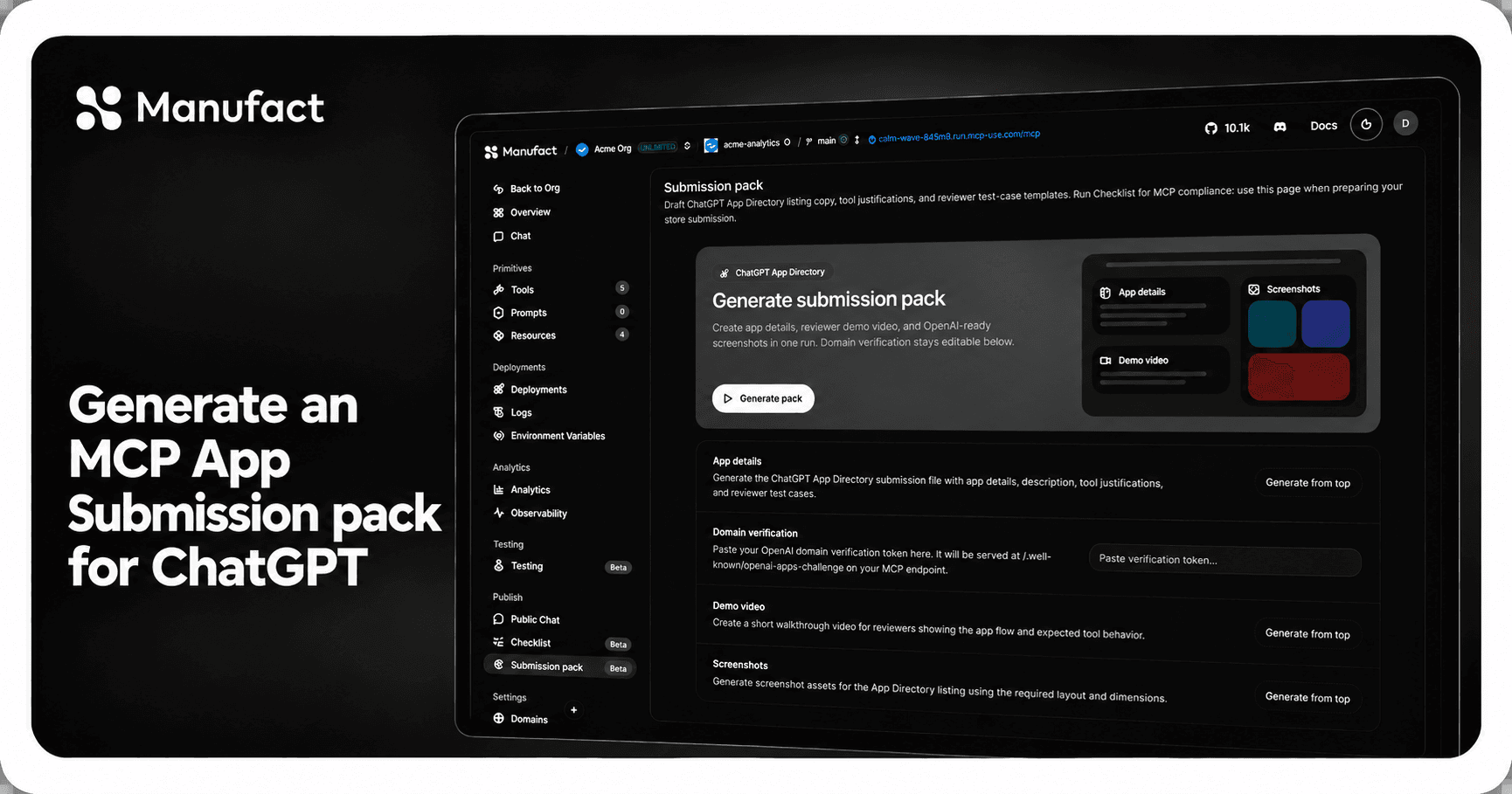
In Manufact, open your server and go to Publish → Submission pack, then click Generate pack. Manufact drafts listing copy, tool justifications, and reviewer test cases from your server's capabilities. It can also generate a demo video and screenshots.
Review the drafts against the workflows you just tested. Correct any claims or expected results that do not match the product. See the submission-pack walkthrough for the dashboard steps, or open the submission-pack product page.
Review the generated materials and verify the required plugin ZIP before submitting. OpenAI's portal checks and review still apply.
3. Submit to OpenAI
Prepare the plugin ZIP
OpenAI's portable layout uses a root plugin.json manifest and an mcp.json file for included MCP connections, with optional skills and assets. Its .codex-plugin/plugin.json compatibility format is also supported. Follow the current package guide, including its schema and examples; do not rename files from a different format and assume they are equivalent.
Keep the package in version control. Before creating the ZIP, inspect the actual archive as well as the working folder. Check for accidental .env files, tokens, customer exports, internal notes, and unused assets. Save the release commit alongside the archive so you can identify exactly what was submitted.
Keep credentials out of the package
Treat the package as distributable content. Reviewer login details belong in the portal's private review fields, not the ZIP, public descriptions, or example prompts.
For authenticated tools, check the OpenAI authentication requirements. OAuth 2.1 integration includes resource and authorization-server metadata, token validation, and compatible client registration. Do not make customer data public to get past a connection error. Reproduce the failing sign-in with a dedicated test account and inspect the authorization flow instead.
Upload and resolve submission checks
In the Plugins portal, select the verified developer and upload the ZIP. Inspect the metadata and skills findings. For MCP, complete the connection, domain verification, authentication, and tool scan. Package fixes require a new ZIP; server fixes can be rescanned. OpenAI documents these checks separately.
Keep a short issue log with three columns: finding, fix, and evidence. That prevents a packaging correction from being confused with a backend deployment. After changing the server, rerun the same task that failed; after changing the archive, inspect the new archive before uploading it.
These are OpenAI's portal checks, separate from the Manufact preparation in step 1. Passing checks does not guarantee approval.
Submit for review
Add five positive and three negative test cases, demo video, release notes, and private access instructions. Submit when the required checks and attestations are complete. Only one review can be active per plugin. See OpenAI's review workflow.
Make each test understandable to someone outside your team:
| Include | Example for a support integration |
|---|---|
| Starting state | A test workspace with three unresolved tickets |
| User request | Summarize the unresolved tickets in this workspace |
| Expected behavior | Return those tickets, with links and a concise summary |
| Boundary case | Ask for a ticket from a workspace the test user cannot access |
| Expected refusal | Do not expose that workspace's ticket contents |
These are illustrative test cases, not claims about a specific product. Use your real tool names, permissions, and expected results. Avoid vague instructions such as “try the app.” Give reviewers enough context to distinguish an intended empty result from a broken integration.
Review your public copy against the plugin guidelines: describe concrete functionality, avoid unverifiable claims, and do not imply OpenAI endorsement. OpenAI says screenshots are no longer displayed in the Directory; useful example prompts matter more than polishing screenshots for the old form.
Publish after approval
Approval is not publication: publish the approved version explicitly. For an existing form-based release, download its release ZIP from the published package menu as your starting point. OpenAI's submission guide also explains update handling.
Keep the submitted version, test instructions, and release notes together. When you change tool behavior, repeat the relevant tests before shipping. Have someone own failures reported after launch; a listing is not a replacement for operating the server.
Common questions
Does connecting my MCP server make it publicly listed?
No. A working private connection and a public directory submission are different outcomes. Decide which you need before preparing a public package.
How long does approval take?
Do not plan a launch around a promised review date. Build time for feedback into the release plan, and treat the portal's status as the evidence of progress.
Does passing a check guarantee approval?
No. Treat automated findings, functional testing, and OpenAI's review as separate gates. Do not describe a readiness result as marketplace approval.
Need help preparing your MCP app for submission?
Bring your server and a real user workflow. We'll help you work through readiness findings and prepare the evidence for review. Start with publishing checks.